Visual Path Tool
A downloadable tool
Stop hardcoding movements. This tool is designed to bridge the gap between developers and designers. It allows level designers and artists to create complex, pre-defined movements in seconds without touching a single line of code. Save hours of development time and keep your scripts clean while creating professional, predictable paths for your game environments.
Main Features
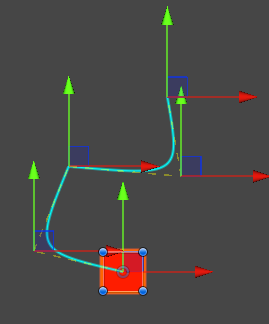
- Visual Editing: Add waypoints and adjust the path using standard Unity handles directly in the scene.
- Dynamic Targeting: The path can automatically track a moving Transform or a changing position in real-time.
- DOTween Integration: Leverages DOTween for high-performance animations.
- Customizable: Easily tweak speed, easing types (Linear, InOut, etc.), and looping behavior.
- Performance Optimized: Extremely lightweight and efficient for static or dynamic paths, making it perfect for busy environments with many moving parts.
How to Use
- Prerequisite: Install DOTween (Free or Pro) before importing this package.
- Attach the
VisualPathControllerscript to the GameObject you want to animate. - Click "Add Waypoint" in the Inspector and move the points in the Scene View to shape your path.
- Configure your speed/ease settings and call
PlayPath()or enablePlayOnStart.
Technical Breakdown
VisualPathController.cs– Handles the core path logic and DOTween execution.VisualPathEditor.cs– The custom Inspector and Scene View interface.BezierPoint.cs– Data class for waypoints and tangents.
Found a bug or have an idea for a new feature? Feel free to leave a comment below!
Download
Install instructions
Installation Steps:
- Prerequisite: Install DOTween before importing this package.
- Download and drag the
.unitypackageinto your Unity project. - Click "Import".
How to Run:
- Add the
VisualPathControllercomponent to a GameObject. - Click "Add Waypoint" in the Inspector to build your path.
Leave a comment
Log in with itch.io to leave a comment.